
Note: This article was written for the module Enterprise IT (113601a) during the summer semester of 2025.
Introduction
An operating system (OS) manages hardware resources, enables application execution, and provides interfaces for users and developers alike. But the context in which an OS is deployed determines its form and function. Desktop operating systems, such as Windows 11 or Ubuntu Desktop, prioritize user interaction, ease of use, and versatility across general-purpose applications. On the other hand, enterprise operating systems—like Red Hat Enterprise Linux (RHEL), Windows Server, IBM z/OS, and IBM i—are engineered for security, scalability, uptime, manageability, and long-term support in mission-critical environments. This article gives a look at the differences between these two categories, focusing on the architectural, operational, and administrative layers that set them apart.
1. Purpose and Design Philosophy
Desktop OS
As the desktop operating system is geared toward individual users, optimized for GUI-based interaction, multimedia support, and flexible software installation. It’s built to handle variable tasks such as browsing, document editing, gaming, and local development. These systems must support a broad range of hardware, from custom-built desktops to brand-name laptops. Their modularity is balanced with a user-friendly experience and minimal technical expertise requirements.
Enterprise OS
By contrast, enterprise operating systems are purpose-built for stability, automation, and high-throughput workloads. Systems like IBM z/OS are used in mainframe environments to handle millions of transactions per second, supporting sectors such as banking and insurance [1]. Similarly, IBM i offers a tightly integrated stack, merging the operating system, database, and middleware to reduce complexity and improve performance [2]. Enterprise OSs are rarely used for direct human interaction but instead serve as platforms for application servers, databases, containers, and critical backend services.
2. Security Models
Desktop OS
Security in desktop systems focuses on protecting the end-user environment: malware protection, file permission integrity, and user authentication. Features like User Account Control (UAC) in Windows or sudo policies in Linux limit access to critical system settings. However, desktop OSs often make trade-offs for usability, such as automatic login, frequent GUI use, and looser application sandboxing.
Enterprise OS
One security model in an enterprise enviorment is for example SELinux, which is integrated into RHEL. This enforces the use of mandatory access controls (MAC) to limit what processes and users can do—even if they are compromised [3]. SELinux operates under the principle of least privilege and includes customizable security policies tailored to enterprise needs. Windows Server supports Active Directory-based access control, BitLocker encryption, and role-based configurations that restrict system functionality based on administrative templates [4]. The difference is not just in the robustness of features but in how they are structured for governance, compliance (e.g., HIPAA, FISMA), and enterprise-grade monitoring [5].
3. Virtualization and Resource Isolation
Desktop OS
Virtualization on desktops is typically used by developers or tech-savvy users, often through applications like VirtualBox or VMware Workstation. Desktop systems can run virtual machines (VMs) but aren’t optimized for heavy virtualization workloads. They lack low-latency I/O, hardware-level passthrough support, and efficient scheduling for multiple guests. Virtualization here is mostly for testing, sandboxing, or running another OS.
Enterprise OS
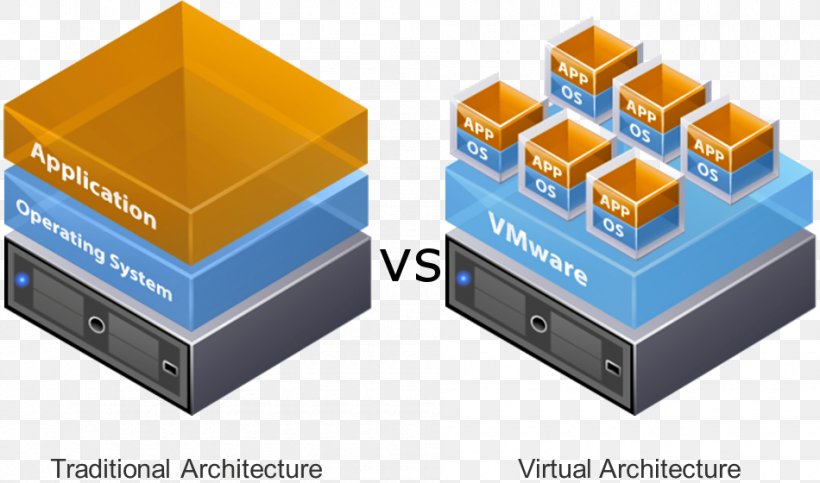
Enterprise OSs, however, serve as hypervisors or host platforms for large-scale virtual environments. RHEL, for example, uses KVM – a full virtualization solution built into the Linux kernel—to efficiently manage guest VMs with high performance [6]. With this it is possible to run multiple different machines on the same physical hardware as shown in figure 1 below. Technologies like SR-IOV (Single Root I/O Virtualization) from Intel allow VMs to access hardware devices like NICs directly, reducing overhead and increasing throughput [7]. In addition, virtualization on enterprise platforms integrates with orchestrators like Kubernetes, facilitating containerization and microservice deployment at scale [8].
4. Lifecycle Management and Support
Desktop OS
Desktop systems typically follow consumer-oriented update cycles, with rapid feature rollouts and shorter support windows. For instance, new Windows versions are released roughly every few years, with frequent patches and UI overhauls in between. This model prioritizes innovation and user experience but is less suitable for stable, long-term deployments.
Enterprise OS
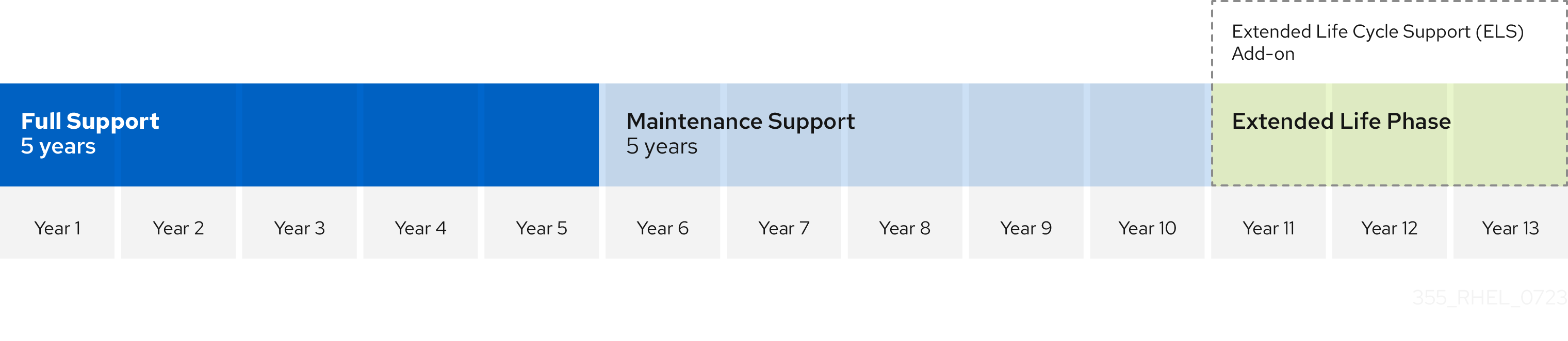
Enterprise OS vendors provide guaranteed support lifecycles, detailed patch schedules, and options for extended support (EUS). RHEL, for example, offers up to 13 years of support, including critical security updates and bug fixes [9]. These suport years are split into sections. While the differences between the Full Support and Maintenance Supprt are minor, like no minor relaeses. In the Extended Life Phase everything is turn down to a minimum, except when having it as an Add-on. With the Add-on it is like the Maintance Support only without updated installation images.
This allows organizations to standardize environments for compliance, manage systems at scale with minimal disruption, and reduce the operational cost of frequent upgrades.
5. Automation and High Availability
Desktop OS
Automation tools on desktops are limited to scripting and task schedulers. There is little support for state-aware automation, and system restoration often relies on GUI-driven tools. Availability tools are mostly limited to hibernation, standby, or basic file backups. As there is little use for automation and availability in a desktop enviorment.
Enterprise OS
Enterprise OSs feature advanced automation frameworks and cluster-aware high availability (HA) services. Tools like Ansible, Red Hat Satellite, or Puppet can deploy thousands of servers with consistent configurations [10]. Cluster solutions like Pacemaker monitor service health and automatically failover workloads to backup nodes to maintain uptime [11] – a capability that’s essential in 24/7 business operations.
6. Interface and System Interaction
Desktop OS
The graphical user interface is the primary mode of interaction. Desktops rely on graphical shells like GNOME (Linux), macOS Aqua, or Windows Explorer.This is as most users do not know how to use shells in todays world. For this reason are GUI-based package managers and system settings the norm. Underlying shells exist (e.g., PowerShell, Bash), but are secondary in typical user workflows.
Enterprise OS
Enterprise OSs minimize or completely eliminate the GUI. Tools like Windows Server Core remove the graphical shell to reduce attack surfaces, system overhead, and reboot dependencies [4]. Most interactions occur via remote command-line tools, APIs, or configuration files. This CLI-first design is more stable, faster to automate, and less error-prone under scripted orchestration.
7. Kernel-Level Optimization
Desktop OS
Desktop kernels are general-purpose. They support a wide range of hardware drivers, prioritize responsiveness and latency, and optimize for interactivity, such as GUI rendering and audio processing. They include more drivers and modules to support plug-and-play peripherals but are not typically optimized for real-time throughput.
Enterprise OS
Enterprise OS kernels are streamlined and hardened. RHEL’s kernel includes NUMA optimization, I/O schedulers, and real-time extensions to reduce jitter in latency-sensitive workloads [12]. Windows Server and mainframe OSs like z/OS provide predictable scheduling, memory partitioning, and support for huge pages and parallel workloads [13].
8. Application and Workload Support
Desktop OS
Desktop operating systems support a broad ecosystem of general-purpose applications: office suites, creative tools, browsers, games, etc. Performance optimization is minimal and focused on user experience rather than workload consistency.
Enterprise OS
Enterprise OSs are designed to run data-centric, transactional, and service workloads. The DBOS project, for instance, proposes an OS that treats databases as first-class citizens—integrating system calls and workload management directly with the data plane [14]. Enterprise OSs are optimized to host container clusters, virtual networks, analytics platforms, and critical applications that demand fault tolerance and monitoring.
Conclusion
The line between desktop and enterprise operating systems is not simply drawn by branding – it is defined by architecture, responsibility, and performance goals.
While desktop OSs aim for flexibility and user-centric experiences, enterprise OSs are tailored to resiliency, scalability, compliance, and automation. Features like SELinux, KVM, and high availability clustering exist solely to ensure continuity and efficiency in systems where downtime is unacceptable.
Whether it’s a massive mainframe running z/OS, a cluster of Linux servers orchestrated via Kubernetes, or a Windows Server environment managing Active Directory, enterprise operating systems underpin the digital backbone of modern industry.
Understanding these differences helps architects and system administrators select and configure the right platform for each use case. As cloud-native paradigms evolve, enterprise OS designs may increasingly draw from distributed systems theory while maintaining their core focus on reliability and scale.
References
[1] IBM 2023, z/OS 2.5.0 IBM Docs. [https://www.ibm.com/docs/en/zos/2.5.0]
[2] IBM 2019, i IBM 7.4.0 IBM Docs [https://www.ibm.com/docs/en/i/7.4]
[3] ArchWiki, SELinux [https://wiki.archlinux.org/title/SELinux]
[4] Microsoft 2025, What is the Server Core installation option in Windows Server? [https://learn.microsoft.com/en-us/windows-server/administration/server-core/what-is-server-core]
[5] Bassil, Y 2012, Windows And Linux Operating Systems From A Security Perspective [https://arxiv.org/abs/1204.0197]
[6] Red Hat 2024, Red Hat Enterprise Linux 10 Docs [https://access.redhat.com/documentation/en-us/red_hat_enterprise_linux]
[7] Intel, Single Root I/O Virtualization (SR-IOV) [https://edc.intel.com/content/www/us/en/design/products/ethernet/adapters-and-devices-user-guide/single-root-i-o-virtualization-sr-iov/]
[8] Kubernetes 2024, Kubernetes Docs [https://kubernetes.io/docs/concepts/overview/what-is-kubernetes/]
[9] Red Hat 2024, Enterprise Linux support and lifecycle [https://access.redhat.com/support/policy/updates/errata]
[10] Red Hat 2024, Automation and management [https://www.redhat.com/en/topics/automation]
[11] ClusterLabs , Pacemaker documentation [https://clusterlabs.org/pacemaker/doc/]
[12] Love, R. (2010). Linux Kernel Development (3rd ed.). Addison-Wesley Professional.
[13] Russinovich, M., Solomon, D., & Ionescu, A. (2012). _Windows Internals_ (6th ed.). Microsoft Press.
[14] Cafarella, M. J., et al. (2020). *DBOS: A Proposal for a Data‑Centric Operating System*. arXiv. [https://arxiv.org/abs/2007.11112]
Leave a Reply
You must be logged in to post a comment.