
Introduction
This is written as part of the assignment for Software Development for Cloud Computing.
NANIWA, which stands for Not Actually Nutzlos Image-converter With AWS, or the name of the region which would become the city of Osaka today, is an image-conversion service hosted solely on Amazon Web Services. It utilizes multiple features on the cloud-computing service platform to give access to anyone at anytime its functionality, but not its source code, and at a price that would be lower than hosting a server for it personally or at the company itself.
The idea stemmed from my internship at Syntegon Technology K.K. (Saitama, Japan) where I was working at the R&D division of the Visual Inspection Department. For the high-speed cameras in the inspection machines, which could inspect up to 600 samples per minute, an image format i3 was created in-house. However, due to time-constraints at the time (over 10 years ago), not much was developed when it comes to working with the i3 format outside of the inspection machines. Last year in 2024, I am still having to develop a shell extension that adds functionality to Windows Explorer for i3 formatted images, which included showing previews and creating icons of the images.
The Problem and the proposed solution
One such problems of working with the i3 format, that was at the time yet unsolved, was with regard to the conversion of the i3 format images into more common image formats, such as jpg or png. As inspection images are vital when writing reports, whether it be Syntegon’s own engineers or the customers, an accessible and easy-to-use i3 image converter would be very handy and would genuinely boost productivity. Especially when it renders the current troublesome way of converting the images obsolete, and if it does not cost a lot to provide such utility.
As such, I have decided to use a tutorial from a LinkedIn post that I found to develop an image-conversion service hosted on AWS. As I do not have access to the i3 format libraries anymore, this proof-of-concept project would be converting from jpg to png instead. Link to said tutorial: https://www.linkedin.com/pulse/how-i-built-serverless-aws-document-converter-from-villanueva-mjmfe/
Architecture
Courtesy of the writer of the tutorial, Frank Kevin V., I am spared from creating an entirely new architecture diagram myself.
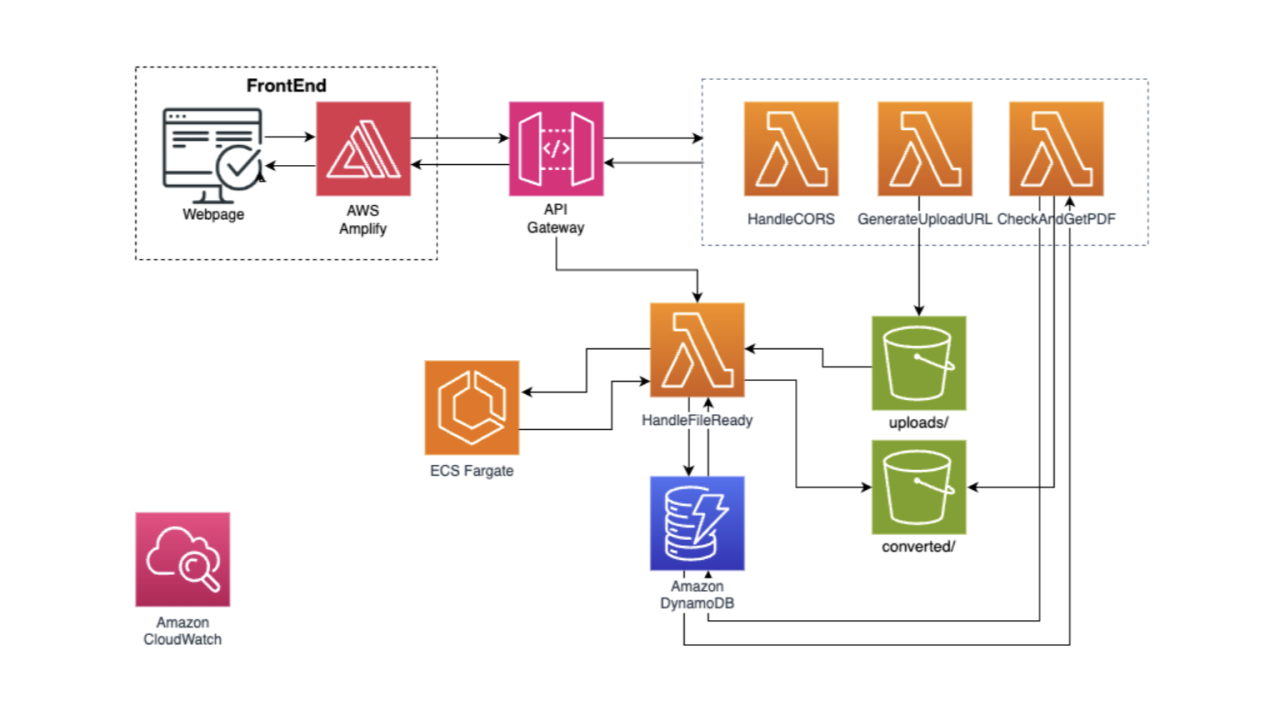
Project architecture diagram (source: LinkedIn post by Frank Kevin V.)
The AWS services utilized are as follows:
- AWS Amplify
- handles the deployment of the frontend/HTML page of the service
- API Gateway
- handles API requests from the frontend and triggers Lambda functions for the file conversion process, as well as getting download links back for the frontend
- Lambda
- handles CORS options, generate pre-signed upload and download URLs for the received and converted files
- triggers the actual image conversion process at ECS Fargate, and check whether the converted file is ready or not
- ECS Fargate
- performs the actual image conversion with a container
- S3
- stores the uploaded and converted images
- uploaded images are deleted after the conversion is completed
- Dynamo DB
- stores a list of images, for which Lambda uses to find the files within the S3 buckets
- Cloudwatch
- for logging and monitoring the various services
Changes applied
Other than general changes in naming, such as the names of the S3 bucket and its folders, or the name of the container in the ECS (Elastic Container Service), there are a few main changes that were applied on top of the original tutorial project:
1. Lambda functions
- CheckAndGetConvertedImages
- Replaces CheckAndGetPDF, no major code changes
- GenerateUploadURL
- Conforms to new S3 bucket naming schemes
- Changed how the file_name variable was used. In the original code, file_name was handled as if it does not contain the file extension in the end of the name – but it absolutely does, and this error was rectified.
- HandleFileReady
- Conforms to new S3 bucket naming schemes
- Added function that actually calls ECS Fargate to carry out the conversion. In the original code, this was not present and thus ECS Fargate was never called at all, unlike what was stated in the tutorial.
- HandleCORSOptions
- no changes (necessary)
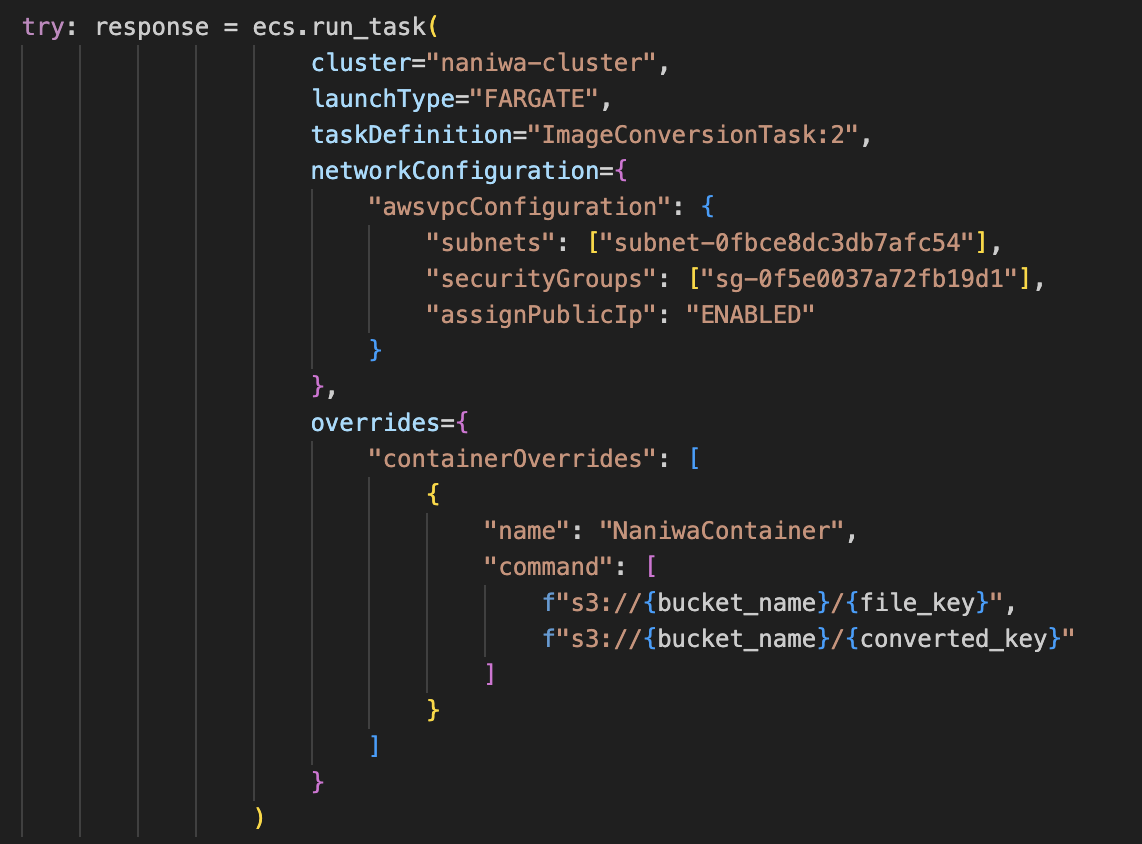
Function added in HandleFileReady that tells the ECS Cluster to do its job (source: me)
2. AWS Amplify
- Instead of uploading a .zip file like in the tutorial, I followed the simple instructions provided by the Amplify UI itself to link it to a GitHub repository.
- Whenever something is pushed into the main branch of the repository, Amplify would take the new files and re-deploy the frontend.
- Minimal changes to the UI were made.
3. ECS Fargate container
- A completely new container is built and deployed in the naniwa-cluster as the ImageConversionService task.
- It’s job is to download jpg files from the S3 bucket within the jpg/ folder, convert it into png, and upload it back into the converted/ folder of the S3 bucket.
Challenges encountered and lessons learned
In general, I have learnt the basic levels of how to combine multiple cloud services provided by AWS together to create a simple application/service.
The Lambda functions were written in python, which is easy enough to understand and modified – though I must confess that I took me an embarrassingly long time to realize that the original function HandleFileReady did not actually call the ECS Fargate to perform the file conversion.
CloudWatch was vital for troubleshooting and it helped a lot that this monitoring system was very easy to setup. It simply was just selecting existing services, and CloudWatch would produce logs of them, albeit in the default format, but they also sufficed so I didn’t attempt to modify the format.
However, at the end I was NOT able to make the ECS Container work as I intend it to, so the application is unfortunately not complete. This will be explained in detail below…
Here are 3 major points in which I have learned quite a bit of:
1. IAM Roles
- IAM roles are roles with different permissions, to which the different services (such as the Lambda functions, ECS Fargate, S3 buckets) are assigned with. Limiting the permission to the duties of the services are obviously very important from both the application design and security standpoint.
- What is equally important is figuring out which permissions are the correct ones – during the first half of the development process, I did have to look up and test around different permissions for the Lambda functions. Not the least because of discrepancies between the permission names in the tutorial and the actual permissions within IAM itself, but also because some permissions are already deprecated or simply does give permissions that I assumed their names suggests they do. But at the end, these are just minor issues (due to the size of this project).
2. ECS container
- This has been another exercise on building my own docker container, and it certainly refreshed my memories of the entire process, from creating the code, the Dockerfile to building and testing with Docker Desktop.
- Ultimately I was unable to make my container service to work. This was mainly due to container permissions and the ImageMagick dependency.
- I was unable to find out how and what permissions I need to give to the ImageConversionTask in order for it to access the S3 buckets, from which images are to be downloaded from and uploaded into. I would assume that it would require more playing around with the IAM roles…
- The other problem was the dependency ImageMagick, which the image conversion relies on. It was included in the DockerFile and was built into the docker container, but ultimately a
magick: command not founderror was thrown for the ImageConversionTask. - So if the container is built with alpine, ImageMagick is unable to process the URL links of the S3 buckets. However, if it is built with amazonlinux instead, it created the permissions and the
command not foundproblems… and at this point, I have lost motivation and have thus left the project unfinished.
3. Working with existing documentation and their trustworthiness
- Adapting external codebase and libraries is crucial here, as much as it is when one is working as a full-time developer. The main problem I had was the fact that the tutorial I followed here is a LinkedIn post – while it does contain a GitHub repository, it was obviously never peer reviewed.
- While it might have been naive of me to assume that such a post/tutorial, written as to attract recruiters and HR to make them think that this was a solid project, it ultimately is not, with the following issues:
- IAM roles were deprecated, some for years already, when I started following the tutorial a month after it was posted. But for this, I only had to search a few times to find the correct permissions to assign with.
- The lambda function code provided for HandleFileReady does NOT trigger the ECS Fargate task at all. While the tutorial does include sections of the ECS cluster creation process, the lambda function provided did NOT contain code that would call upon the ECS cluster task at all. While it took me a bit of time to finally realize that, I cannot imagine that an actual developer with AWS experience would need anytime at all to spot this problem.
- Screenshots of the AWS interfaces are somehow outdated already, again, while I was following the steps a month after the tutorial was posted.
- Except for the frontend, which was uploaded via a zip file, the tutorial showed all the code being entered with the native code editors provided in the AWS consoles. This is primitive and while I was not able to automate code deployment for every services, I had minimized the need for relying on the AWS consoles where ever possible (such as the Amplify GitHub integration).
- Other minor code errors that should have been fixed or the entire project would not have functioned, and optimizations that should have been applied.
- Ultimately I am confused as to how the tutorial claimed that the project functions at all, or how the “proof” was produced with the code provided. However, in all fairness, I have to thank the author for the tutorial, since it did point me in the right direction. It would have taken me a lot more time if I had to navigate and figure out the AWS cloud services platform myself.
Conclusion
Overall this was a fun project to do, and I had learned a lot about working with the AWS cloud services. Should the need arises in the future, I can hopefully apply the knowledge and experiences learned here onto AWS again or other cloud service platforms. As mentioned by a fellow student, this project is in theory compatible, if not ready, for converting i3 images as well, as long as the Docker container is switched to one that can process i3 images (and actually functions).
Though whether the company would approve of such a project, is another matter entirely…
Author
- Kei Wai Lam
Leave a Reply
You must be logged in to post a comment.