
Motivation
Professional file sharing is a significant challenge in sectors such as healthcare, insurance, and consulting. Practitioners routinely need to exchange sensitive documents with clients, yet existing solutions such as Google Drive and OneDrive can quickly become disorganized when managing multiple cases. Users struggle with scattered links, having to manually control access for each recipient and offer an inconvenient user experience to their clients.
For my System Engineering & Management project, I addressed these issues by designing and implementing a cloud-native web application specifically built for case-based file sharing on Amazon Web Services (AWS).
This article explains the architecture and the technology stack, some of the architectural decisions as well as the challenges encountered during the implementation.
Objectives
Features
The application was designed around four core features:
Secure File Exchange
The platform should allow sharing of private documents within a case that are only accessible by the user who created the case and the client which is assigned to the case. In the initial minimum viable product (MVP) only common file formats for documents and images are supported like pdf and png, files are limited to 100MB in size. However the architecture should allow support for additional file formats and larger files in the future.
Case and Client Management
Users should be able to create, update, and delete cases and clients through the User Interface of the Application.
File Management
Within each case, users and clients can upload, download and delete files.
Email Notifications
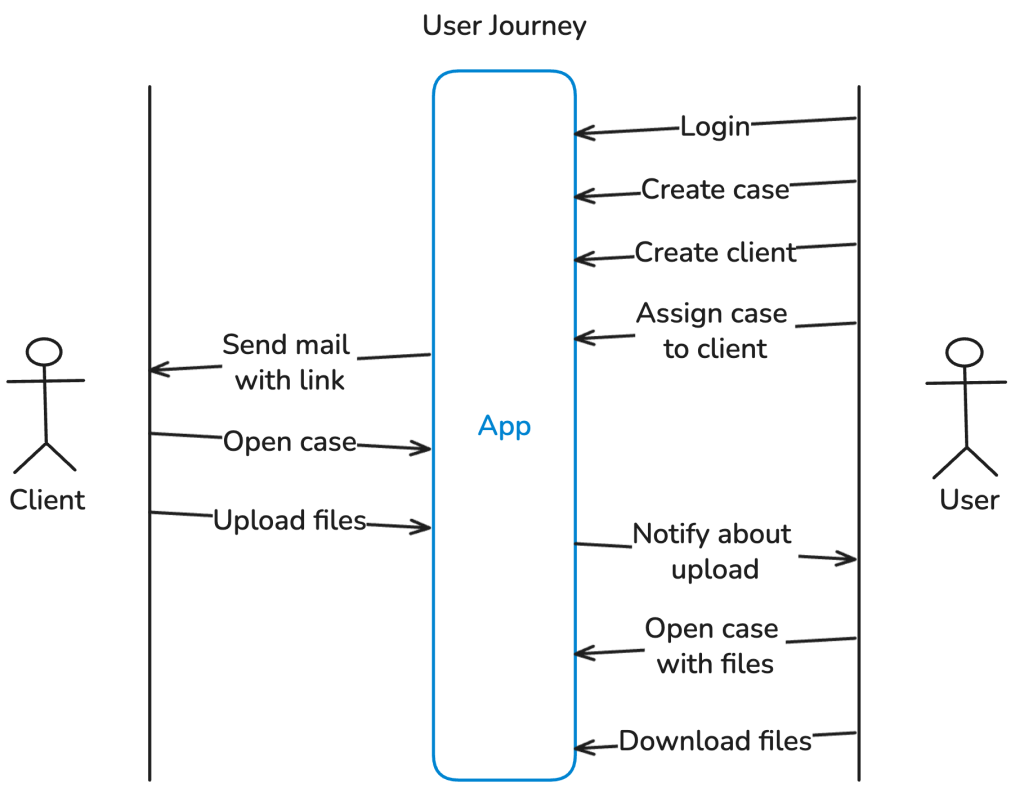
When a user creates a case, the assigned client receives an email with a link that gives them access to it. The system also notifies users when clients upload files to their cases. To avoid notification fatigue, the application should consolidate multiple uploads into a single email rather than sending separate notifications for each file.
User Journey
The diagram below shows the typical user journey for users and clients enabled by the resulting application.
Non-functional objectives
The application was designed around the following non-functional requirements, which justify most of the architectural decisions:
Scalability
The system should be able to handle an increasing number of users and files without experiencing any performance issues or requiring additional infrastructure changes that involve manual operative efforts. For that the system should scale automatically in or out depending on the current load.
Cost Efficiency
Since this is a student project, the aim was to keep costs as low as possible. Although AWS offers free credits for new accounts, I wanted to build the application using services that incur minimal costs, especially for infrequent usage, so that I can keep it deployed for longer than the free trial. This is also a side effect of the ability of scaling in when the application is not used.
Data Durability
The main purpose of the application is to exchange and store files, so it is crucial to choose a storage solution that is durable and designed to prevent data loss, even in the event of hardware failure or infrastructure issues.
Security
For the application to be useful for sharing private files, it needs to implement basic security features: This includes encrypting Data-at-Rest [1] e.g. by using server-side encryption (SSE) in S3 [2] and Data-in-Transit [1] e.g. by using Transport Layer Security (TLS) protected network connections with the users (HTTPS) [3]. The application should also implement proper access controls so that clients can only access the cases and related files to which they have been assigned, and users can only access the clients and cases with their related files that they initially created.
Architecture
The application is build on several services of the cloud platform Amazon Web Services (AWS). In order to keep the implementation overhead low, and reduce operational burden I followed the design principle of the AWS Well-Architected Framework for Operational excellence [4] and chose managed services like Cognito [5] for the Authentication and a AWS Lambda for Compute to run the backend.
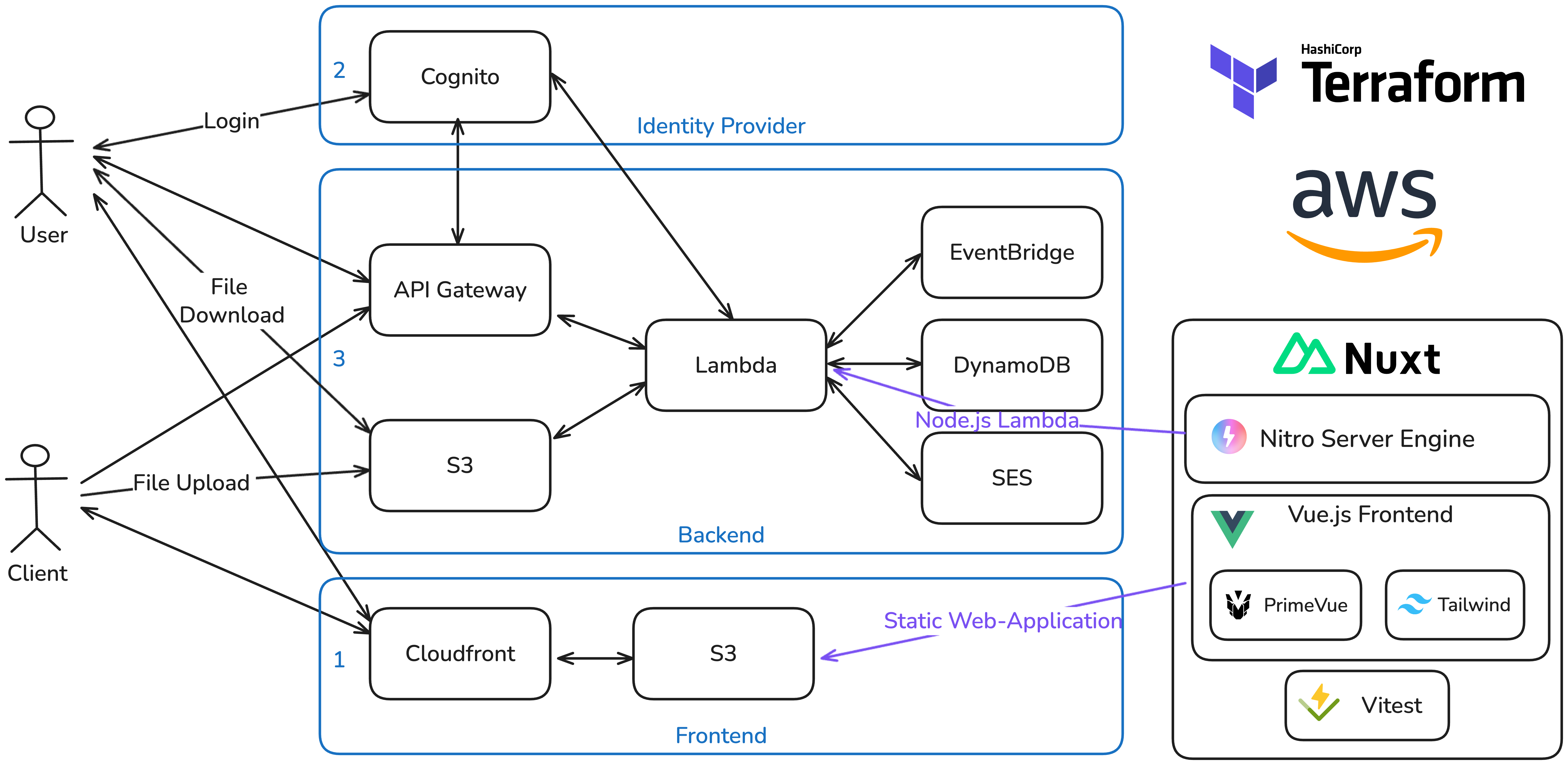
The graphic above shows the overall architecture of the application from an infrastructure perspective.
The frontend is hosted as a static web-application: A Cloudfront distribution serves the content from an S3 Bucket that is connected as origin. The S3 Bucket contains the static files generated by the Frontend Framework to display the website on the client side. In order to map a custom domain to it, there are 2 CNAME Records in place: The first maps a custom sub-domain to the Cloudfront Distribution domain name d134qhyyyab1uv.cloudfront.net and the other one verifies the domain ownership for a custom TLS Certificate provided by the Amazon Certificate Manager (ACM). This certificate is then attached to the Cloudfront Distribution in order to have a valid TLS Encryption in place when accessing the site via the custom sub-domain. The users as well as the clients are accessing the application via this static web-application.
Users need to authenticate. In order to avoid implementing a custom Identity Provider and User Management I chose to go with the Software-as-a-Service (SaaS) solution for Identity Management Cognito that AWS offers. In Cognito I created a user pool. The pool comes with user management and Authentication features. For the purpose of this project I manually created the users of the user pool within the AWS console. Adding a Sign-up option would have been only a matter of configuration. Cognito serves as an OpenID Connect (OIDC) provider [6]. When users are clicking on the Login button in the web-application they get redirected to a custom sub-domain that resolves to a hosted login site provided by Cognito, after entering the username and password on the dedicated site the authentication flow is performed and the user gets redirected back to the application. The application ends up with an ID Token and an Access Token each in form of a JSON Web Token (JWT) [7]. This follows the standard OIDC authentication flow. With this solution the potential security risks of managing a custom log-in, hosting a login page etc. is outsourced to the SaaS solution and the application itself ends up with a standardized authentication and short lived tokens that can be used to authenticate requests towards the REST API of the backend.
When the frontend makes requests to the backend it calls a custom domain that resolves to an API Gateway in AWS. This managed service is the gatekeeper for requests, can handle for example authentication and rate limits and can forward the requests to AWS Lambda for processing.
For API requests with the path /api/users/* which are only accessible for authenticated users, API Gateway validates the provided token from the Authentication header directly via an integration with the Cognito services, and forwards requests to the lambda function only when the token is valid. In this way unauthorized requests are denied as early as possible even before costing compute capacity from AWS Lambda.
A single lambda function serves as the backend of the application and integrates with the other AWS services, like DynamoDB a Platform-as-a-Service (PaaS) No-SQL Database services that is used as a database for example to store details about cases and clients. The integration of Simple Email Service (SES) allows the lambda function to programmatically send out emails. The integration of EventBridge allows the Lambda function to schedule a self-invocation at a later stage, this is required for the upload notification feature (for details refer to option 3 for upload notifications). By integrating with the Cognito Admin Interface, the Lambda function is able to resolve userIds to user details like email addresses that are required for sending out the notifications.
For the functionality of up- and downloading files the lambda utilizes the presigned URL feature of S3 [8], the object storage service of AWS: In order to upload a file, the user or client requests a signed URL via an API call to the lambda function. The lambda responds with a signed URL generated via the S3 SDK. Finally the frontend performs the upload or download of the file directly to S3 via this signed URL. The signed URL authorizes anyone with the link to access a specific storage location for a limited time (in this case 1h) directly via S3. With that the complexity of handling a file upload is outsourced to the service.
The configuration of all required AWS resources were implemented as code with the infrastructure as code tool Terraform [9] in order to have a reproducible infrastructure and to keep track of all the created resources.
Frontend Implementation
The frontend is implemented with the javascript framework Vue.js [10]. To speed up the development and keep the efforts for an appealing user interface low I utilized the UI component library Primevue [11] and extended the styling when necessary with the CSS-Framework Tailwind [12]. I wanted to keep the code for the frontend and backend within the same project to reduce overhead for example by sharing the DTO interfaces between both words or having the same typescript configuration. For that I used the full-stack Framework Nuxt [13] which is designed around Vue.js and offers with Nitro [14] a server toolkit that allows for implementing backend functionality that runs on the same Node.js development server.
In the deployment process of the frontend, Nuxt renders a server side web-application from the Vue code that is synced to the S3 bucket via a Bash script that also handles the invalidation of the Cloudfront cache to instantly distribute the new frontend version on the CDN.
Backend Implementation
In order to run the backend implementation on AWS Lambda, Nitro offers a built-in preset to generate an output format which is compatible with the Node.js runtime of the serverless function service. The generated function is then archived and uploaded to AWS Lambda via Terraform. In that way fronend and backend share a code base, run together locally but can be deployed to separate providers and services which is a huge benefit of Nuxt in my opinion.
For the backend implementation, I decided to use a layered architecture and came up with the following design:
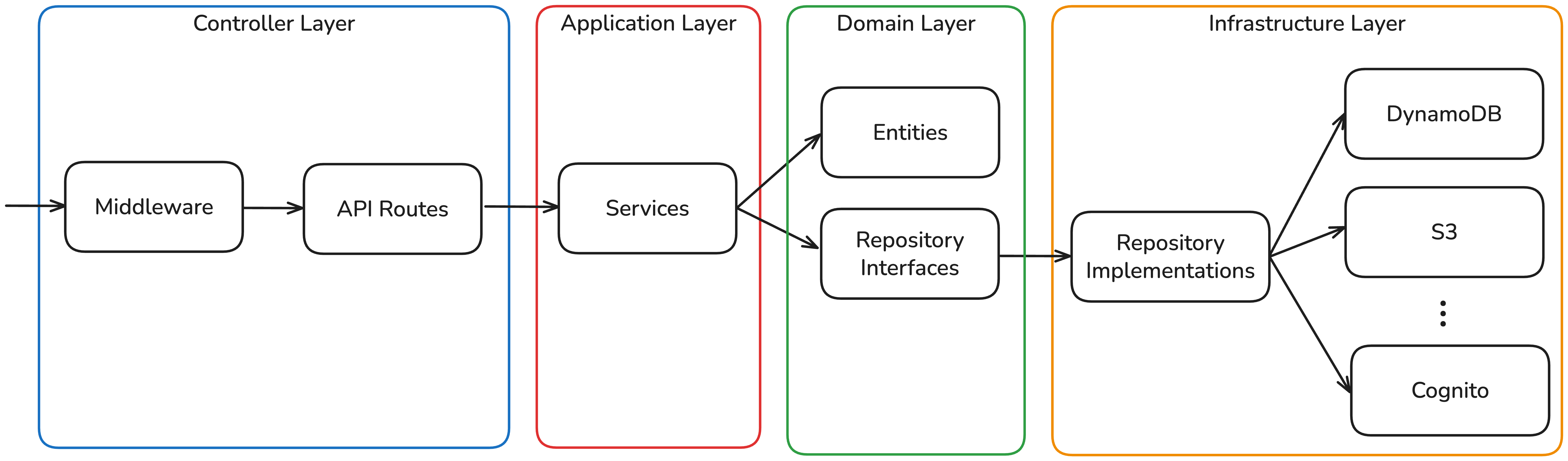
When a request arrives via the API Gateway, it first passes through a set of middlewares that set CORS headers, validate the authorization token and extract the claims in order to obtain the UserId. This ensures that users can only access their own cases, since the UserId is always derived from the token claims rather than from user input. For client requests, the middleware validates a JWT that was sent as part of the invitation link, which contains the ClientId and CaseId as claims, restricting access to the assigned case.
After the middleware layer, the request is routed to a controller-like structure based on the path. The controllers consume services that are provided through a DependencyFactory. These services contain the business logic and depend only on domain entities — the class representations of concepts such as a case or a file — and on repository interfaces that abstract the underlying infrastructure. For instance, the CaseRepository interface defines methods for saving and deleting cases. These interfaces are implemented in the infrastructure layer: a DynamoDBCaseRepository class concretely implements the persistence logic against DynamoDB. The DependencyFactory integrates these concrete implementations into the services, thereby keeping the business logic decoupled from any specific infrastructure concerns.
For security purposes, secrets such as those used to sign JWTs for the client invitations are loaded at runtime from the AWS Parameter Store rather than being hardcoded or passed as environment variables.
Architecture decisions in detail
In this section I want to highlight two architecture decisions in detail, walk through the options I considered for each and explain why I ultimately chose the respective solution.
File upload
For the file upload functionality I evaluated three possible architectures:
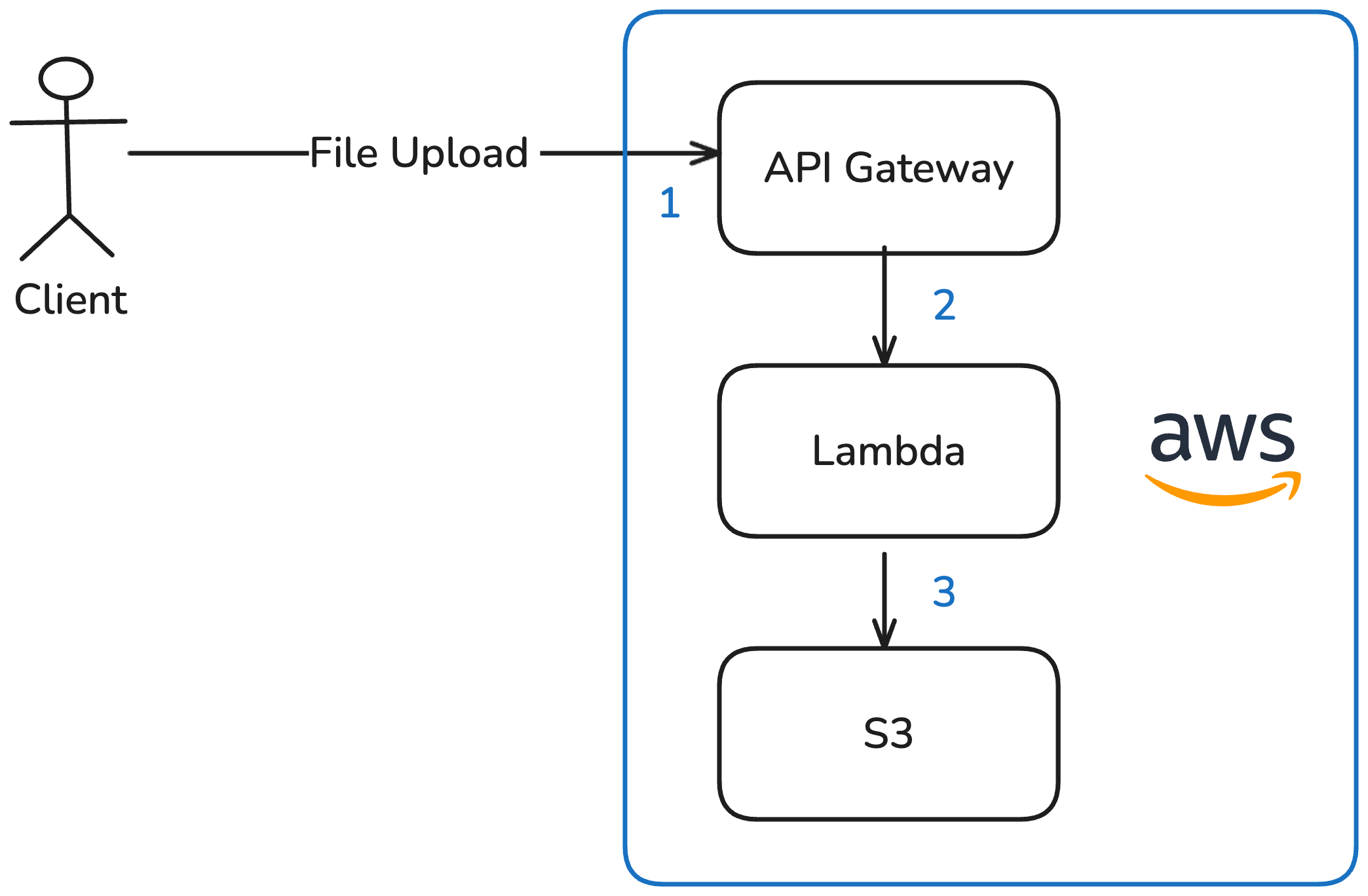
Option 1: Upload via Lambda to S3
The file is sent as an HTTP request via the API Gateway to the Lambda function, which then stores it in S3.
Advantages:
- Straightforward to implement
- Remains a fully serverless solution
- S3 as object storage offers strong benefits for further use of the files:
- Content distribution via CloudFront
- Event-driven integration with other AWS services on upload
- Virtually unlimited storage capacity
- High availability and durability through built-in replication
Disadvantages:
- Lambda execution time and memory are tightly constrained (max. 15 min), making this approach practical only for small files
- The complexity of handling uploads has to be implemented within the Lambda function itself.
Although this option is simple and leverages the benefits of S3, Lambda’s runtime constraints limit future expandability to support larger files.
Option 2: The Classic — upload via EC2 to EBS
The file is sent as an HTTP request to an application running on an EC2 instance. This application stores the file on an attached Elastic Block Store (EBS) volume.
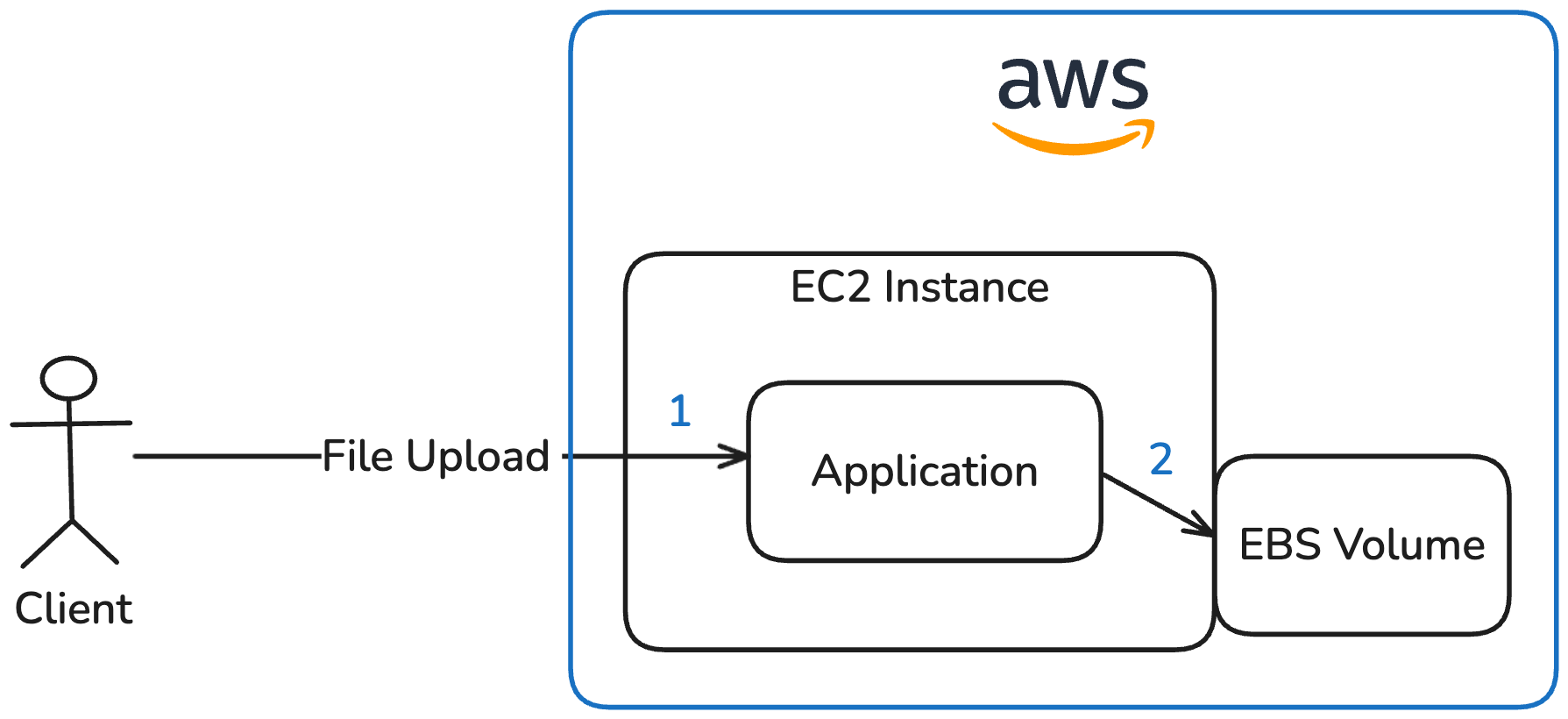
Advantages:
- Straightforward to implement
- Portable to other cloud providers or even to a single VPS
Disadvantages:
- Handling upload complexity has to be implemented in the application
- EBS volumes are limited in size
- Scales poorly and only with significant effort (load balancer, multiple EC2 instances, shared volumes, etc.)
- Limited availability and fault tolerance out of the box
- Manual backups for EBS volumes are required
This option illustrates a solution that does not rely on S3.
However, this approach was ruled out because it contradicts the application’s serverless, fully managed design goals of the application and introduces considerable operational overhead.
Option 3: Fully Serverless — Presigned URLs (chosen)
Before uploading a file, the frontend requests an upload URL via the API Gateway. The invoked Lambda function then uses the S3 SDK to generate a presigned URL, specifying the target location, file format and file name in S3. This URL is only valid for a limited time. The frontend then uploads the file directly to S3 using this presigned URL.
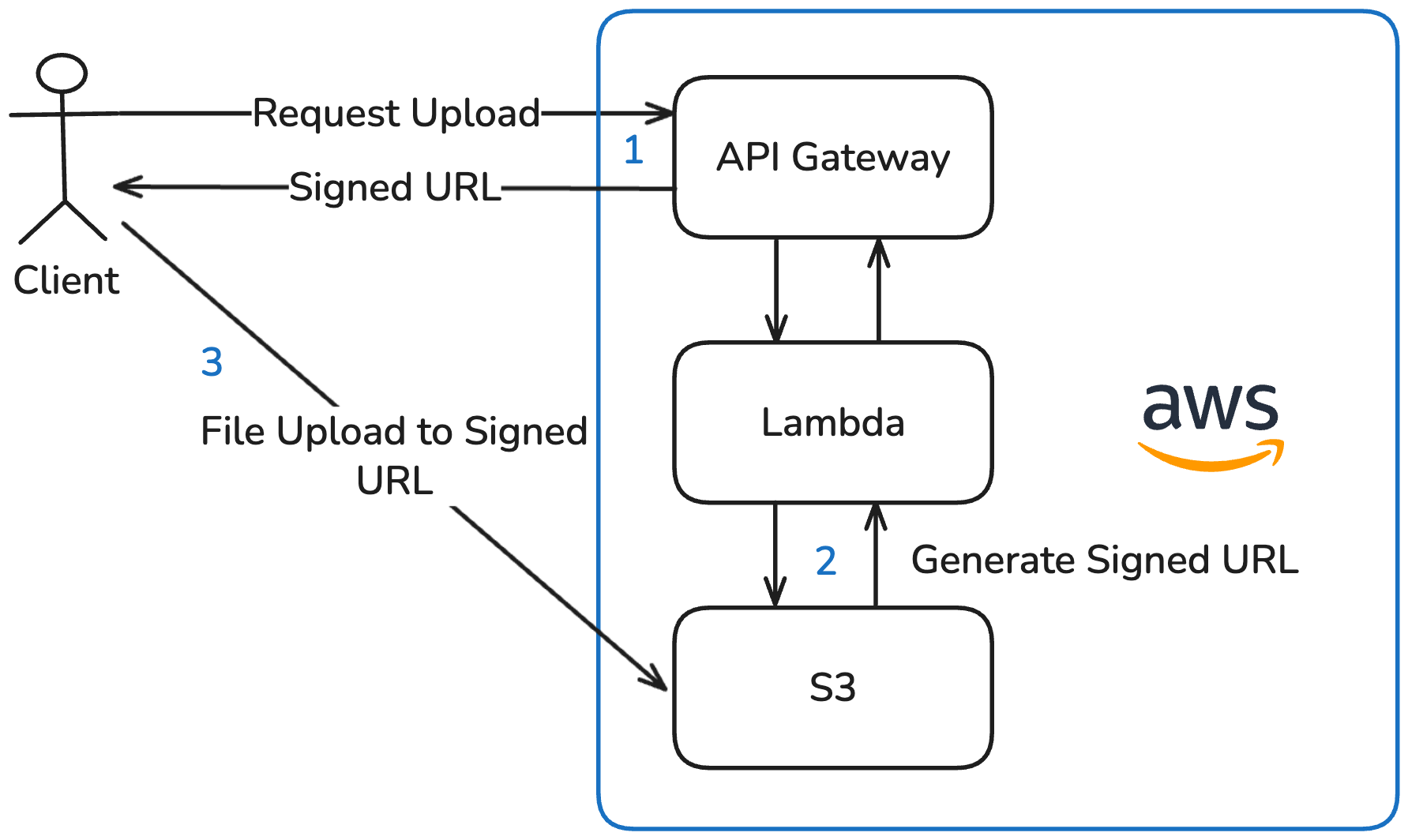
Advantages:
- Upload complexity is fully offloaded to the S3 service
- Remains a serverless solution
- All benefits of S3 (as listed in Option 1)
- Independent of Lambda runtime constraints
Disadvantages:
- Potential vendor lock-in — though this is limited, as most major cloud providers such as Google Cloud and Oracle Cloud offer S3-compatible object storage with presigned URL support
This option combines the benefits of S3 with a fully serverless architecture while eliminating the Lambda runtime limitations of Option 1, which is why I chose it for the application.
Upload notifications
The second architecture decision I want to elaborate in detail is the solution to notify users when a clients are uploading files to one of the users cases. I considered three approaches:
Option 1: S3 Event-driven notification
The S3 upload event triggers a Lambda function that resolves the file information by its ID and sends an email to the user via SES.
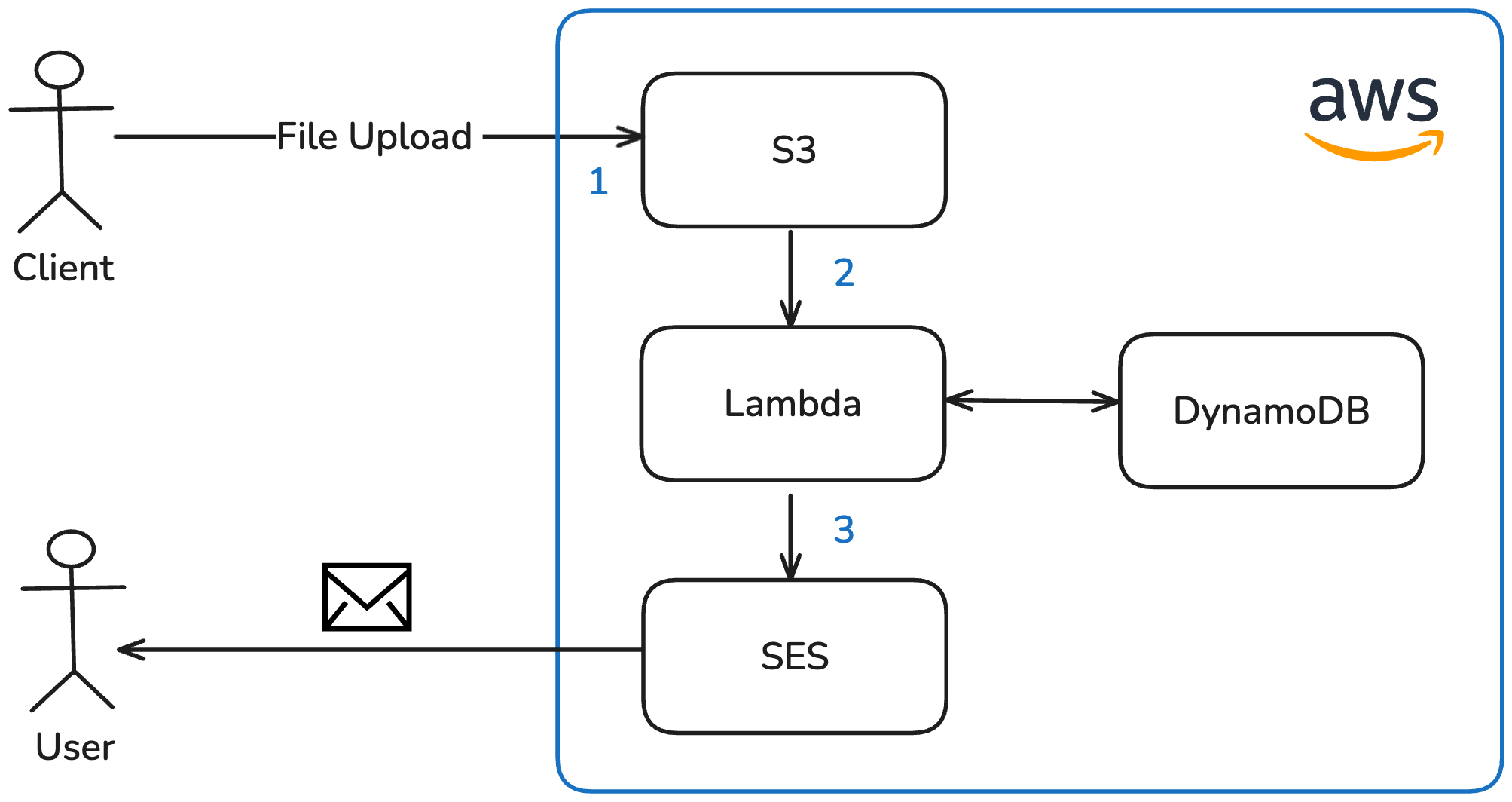
Advantages:
- Straightforward to implement
- Event-driven architecture
Disadvantages:
- Requires a separate Lambda function, since S3 events invoke Lambda functions differently than the API Gateway — resulting in additional implementation efforts and a separate codebase
- Each upload triggers the Lambda individually, so uploading multiple files results in multiple emails being sent — potentially solvable via upload tracking in DynamoDB, but adds complexity
This option was ruled out because it requires maintaining a second Lambda function and does not natively consolidate notifications for multiple file uploads.
Option 2: Client in Control
Once the client has finished uploading files or closed the page, the frontend triggers the notification by sending an HTTP request to the backend.
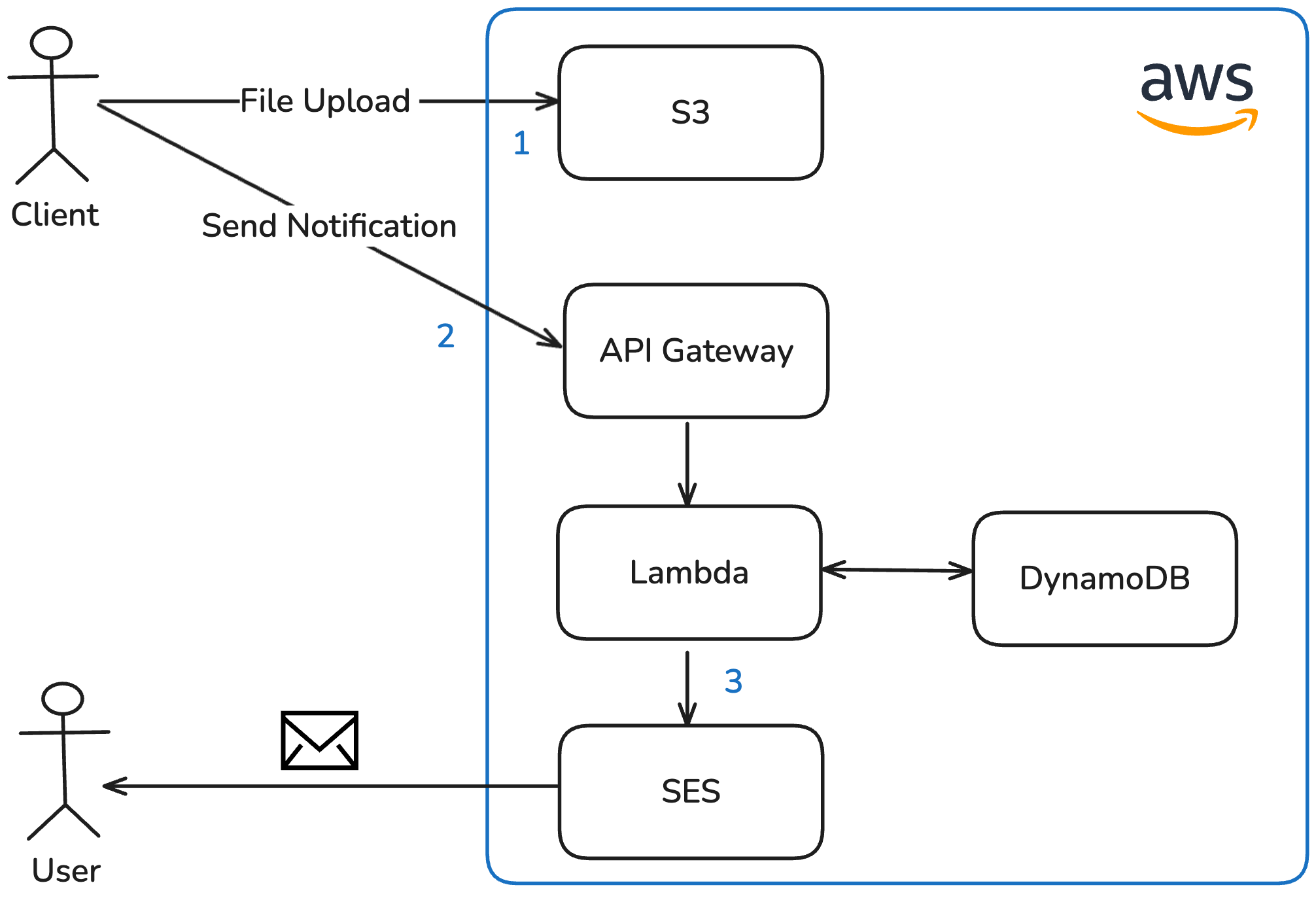
Advantages:
- Simple to implement
Disadvantages:
- The notification endpoint must be secured against misuse
- Unreliable — if the client is unable to make this request (e.g. due to a network issue or closing the browser prematurely), no notification will ever be sent
This option was ruled out because it relies on the client triggering the notification, which makes it unreliable and shifts critical backend responsibility to the frontend.
Option 3: Delayed self-invocation via EventBridge (chosen)
When a client requests a presigned URL for uploading a file, the Lambda function uses the EventBridge service to schedule an invocation of its own internal endpoint after a configurable delay (in this case 5 minutes). If an invocation is already scheduled for the same case, it is cancelled and rescheduled. This means that uploading multiple files within the delay window results in only one notification email at the end. The delay should be long enough for the upload to complete. With the maximum file size set to 100 MB, a 3 Mbit/s connection is sufficient to finish within the timeframe. Once re-invoked after the delay, the Lambda function verifies that the files have actually been uploaded to S3 and sends a consolidated email to the user via SES.
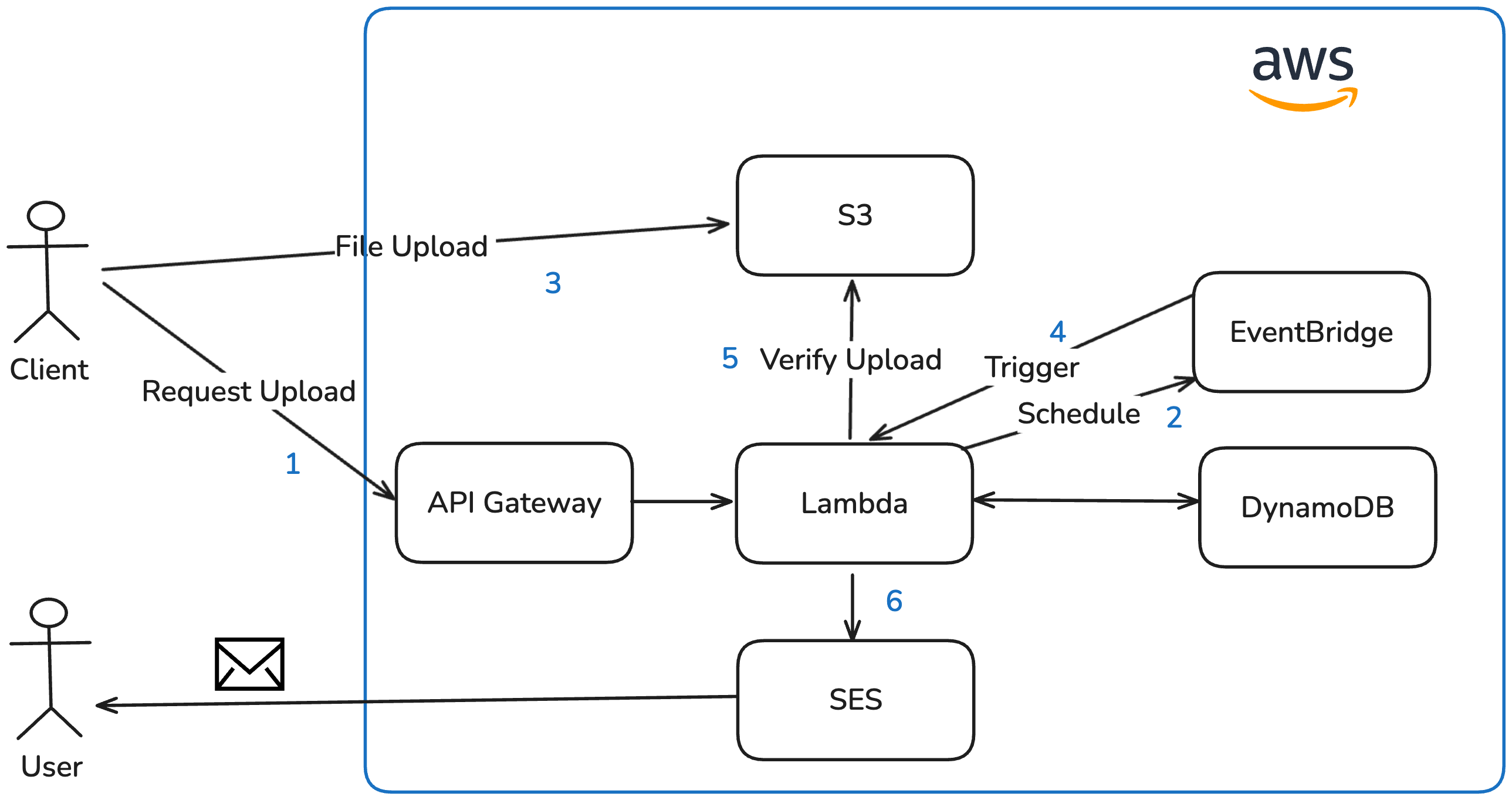
Advantages:
- Duplicate emails are avoided by consolidating multiple uploads into a single notification
- Reuses the same Lambda function — no additional codebase required
Disadvantages:
- The delay must be set to a value large enough to allow the upload to complete
I chose this option because it keeps the notification logic in the backend, reuses the existing Lambda function, and reliably consolidates multiple file uploads into a single email independent of the client.
Challenges Encountered
Database choice and table design
One of the biggest challenges during the implementation was my initial choice of database. I opted for DynamoDB as I wanted a cost-effective, serverless database that could deliver strong performance. As a NoSQL database, it also saved me from having to deal with database migrations during development.
However, the application’s data — cases, clients, and files — relates to each other in a way that is important for the business logic. For example, knowledge about which client is assigned to which case, or which files belong to a given case. Resolving these relationships with DynamoDB required multiple separate database requests, whereas a Structured Query Language (SQL) database would have handled this with a single JOIN operation.
Furthermore, DynamoDB’s query capabilities are fairly limited. This became especially apparent when implementing the client search: Since DynamoDB’s query operations are case-sensitive, I ended up adding a dedicated search field to each entity containing all relevant attributes in lowercase, essentially duplicating data solely for search purposes.
In hindsight, I would model the data first before choosing a database. Given the multiple relations between entities, a SQL database would have been a better fit, since the DBMS itself can handle concerns such as searching and joins, which I had to implement manually.
Difficulties with Terraform and the AWS provider
Another challenge was implementing the infrastructure as code with Terraform. Although the AWS Terraform provider is mature and well-maintained, managing the many interdependent resources required careful attention to dependency ordering.
For example was the Lambda function, which needs its own Amazon Resource Name (ARN) as an environment variable to programmatically schedule its delayed self-invocation via EventBridge. At the same time, the Identity and Access Management (IAM) role for EventBridge also requires the Lambda’s ARN in order to restrict which function can be invoked. Since a resource’s ARN is only known after creation, this creates a circular dependency that Terraform detects and refuses to apply. My solution was to derive the ARN manually from the Lambda function name, the AWS region, and the account ID, and pass it as an environment variable before the function was actually created which effectively broke the cycle.
Another difficulty arose from the Domain Name System (DNS) records needed to validate TLS certificates for custom domains. As I did not want to transfer my domain’s DNS management to Route 53, I could not create the necessary validation records directly through Terraform. Instead, I created the ACM certificate modules separately: After the first terraform apply, the required DNS records were output, which I then added manually at my hosting provider. Once the certificate status changed from pending to active, I passed the certificate ARN as a variable into the dependent modules (e.g. API Gateway or CloudFront distribution), which only created the resources requiring the certificate when that variable was set. Using Route 53 would have made this integration significantly simpler, but was not an option in my setup.
Overall, this project reinforced the importance of Infrastructure as Code for me, especially with cloud providers like AWS where the sheer amount of configuration makes it almost impossible to maintain an overview without it.
Evaluation of non-functional objectives
Let’s review how the resulting application meets the non-functional objectives defined at the beginning.
Scalability
The application scales within a single AWS region, bounded only by the service limits of the individual AWS services. These limits are generally high and can often be increased on request. Some are worth keeping in mind during the design phase — for example, S3 throttles requests per prefix, so I implemented file storing in a way that each case uses its own prefix, effectively making the limit per-case rather than for the whole application. Below are a few examples of default service limits:
- API Gateway: 10,000 requests per second [15]
- S3: 5,500 GET/HEAD requests per second per prefix [16]
- DynamoDB throughput: 40,000 read request units and 40,000 write request units per table on demand [17]
These numbers are high enough that they are unlikely to become a bottleneck in practice. However, it is important to know them in order to understand where the application would eventually stop scaling.
Cost Efficiency
By relying exclusively on serverless AWS services, the application incurs no fixed costs — billing is entirely usage-based. This applies to all services including Cognito, which charges per monthly active user. This model is ideal for irregular or low traffic scenarios like this project. For workloads with predictable, steady traffic, costs could be reduced further by reserving provisioned capacity for services like Lambda and DynamoDB.
Data Durability
By storing all data in managed AWS services, durability risks are fully delegated to the platform provider. S3 provides 99.999999999% durability and 99.99% availability of objects over a given year through built-in replication [18], while DynamoDB offers 99.99% availability [19] and supports Point-in-Time Recovery, enabling data to be restored to any second within the retention window.
Security
The application implements multiple layers of defence: Authentication follows the standard OIDC flow via Cognito, and tokens are validated twice — first by API Gateway and then by the Lambda middleware. Data-at-Rest is encrypted through S3 server-side encryption and DynamoDB’s default encryption, while Data-in-Transit is protected via TLS certificates across all endpoints. IAM roles adhere to the principle of least privilege, granting each service only the permissions it strictly requires.
Combined, these measures provide a solid security baseline. In an enterprise context, security scanners, certifications and penetration testing [20] could provide additional confidence and compliance, reducing the risk of security vulnerabilities in the implementation.
Possible future improvements
Finally a short outlook on a few technical improvements that could be made in the future:
Disaster recovery
Complement DynamoDB’s Point-in-Time Recovery with scheduled backups via AWS Backup, stored in a separate region [21] and protected against ransomware attacks [22].
Storage cost optimization
This can be achieved with S3 Lifecycle Policies that automatically move infrequently accessed files to cheaper storage tiers such as S3 Infrequent Access, if the access patterns are unpredictable S3 Intelligent-Tiering could be also an option [23].
Larger file uploads
Support files that are significantly larger than the current limit of 100 MB by leveraging S3 Multipart Uploads [24].
Per-case encryption
Encryping files on a per-case basis using S3 server-side encryption with a customer-provided key (SSE-C) [25]. The key is then stored in the case’s database record. This would ensure that even if the S3 bucket were compromised, files could not be read without access to the corresponding database record.
Literature
[1] https://www.cloudflare.com/de-de/learning/security/glossary/data-at-rest/
[2] https://docs.aws.amazon.com/AmazonS3/latest/userguide/UsingServerSideEncryption.html
[3] https://www.cloudflare.com/de-de/learning/ssl/transport-layer-security-tls/
[4] https://docs.aws.amazon.com/wellarchitected/latest/framework/oe-design-principles.html
[5] https://aws.amazon.com/de/cognito/
[6] https://openid.net/developers/how-connect-works/
[7] https://www.jwt.io/introduction#what-is-json-web-token
[8] https://docs.aws.amazon.com/AmazonS3/latest/userguide/ShareObjectPreSignedURL.html
[9] https://developer.hashicorp.com/terraform
[10] https://vuejs.org/
[11] https://primevue.org/
[12] https://tailwindcss.com/
[13] https://nuxt.com/
[14] https://nitro.build/
[15] https://docs.aws.amazon.com/apigateway/latest/developerguide/limits.html
[16] https://docs.aws.amazon.com/AmazonS3/latest/userguide/optimizing-performance.html
[17] https://docs.aws.amazon.com/amazondynamodb/latest/developerguide/ServiceQuotas.html
[18] https://docs.aws.amazon.com/AmazonS3/latest/userguide/DataDurability.html
[19] https://aws.amazon.com/dynamodb/sla/
[20] https://www.cloudflare.com/en-gb/learning/security/glossary/what-is-penetration-testing/
[21] https://docs.aws.amazon.com/aws-backup/latest/devguide/cross-region-backup.html
[22] https://docs.aws.amazon.com/aws-backup/latest/devguide/vault-lock.html
[23] https://docs.aws.amazon.com/AmazonS3/latest/userguide/object-lifecycle-mgmt.html
[24] https://docs.aws.amazon.com/AmazonS3/latest/userguide/mpuoverview.html
[25] https://docs.aws.amazon.com/AmazonS3/latest/userguide/ServerSideEncryptionCustomerKeys.html
Leave a Reply
You must be logged in to post a comment.